Smart Meter Texas For Your Electricity Usage Data
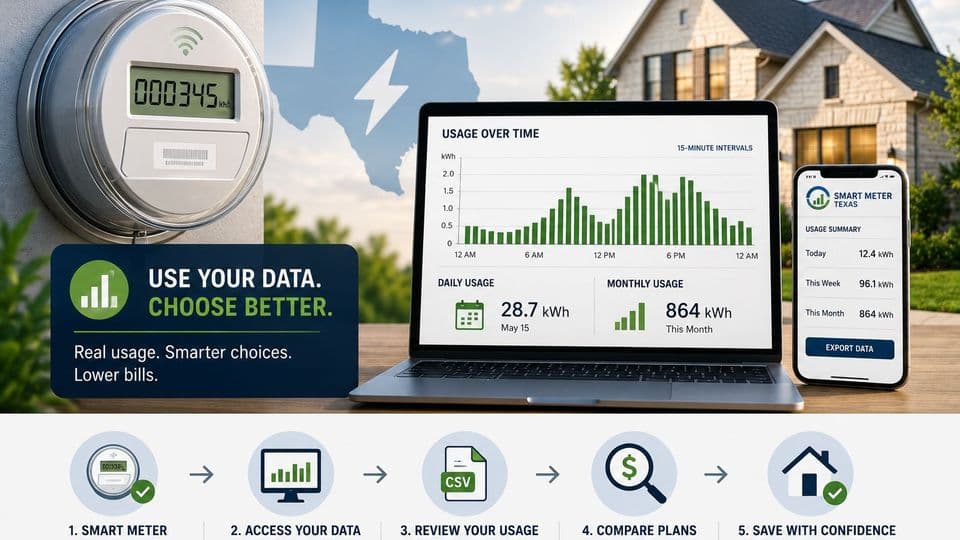
Smart Meter Texas can help you see when and how much electricity your home uses, but the data only helps if you know how to apply it to Texas plan documents, TDU charges, and usage-based pricing.
Key Takeaways
- 1Smart Meter Texas is the portal for supported Texas customers to view, download, and share detailed usage data. It is not the meter itself or an electricity provider.
- 2Texas smart meters, also called Advanced Metering Systems, can record usage in 15-minute intervals instead of relying only on a monthly read.
- 3The TDU handles the meter and local wires, while the REP sells the electricity plan and usually bills the customer in deregulated Texas areas.
- 4Usage history can help shoppers compare fixed-rate, time-of-use, free nights, weekend, and bill-credit plans against their real usage pattern.
- 5Smart meter data can help identify better plan fits, but it does not guarantee savings or remove regulated delivery charges.
What Smart Meter Texas Actually Does
Smart Meter Texas is a customer portal for viewing, downloading, and sharing detailed electricity usage data from supported Texas smart meters. It stands apart from your retail electricity provider and from the physical meter on your home. The shopper value comes from seeing real usage patterns before comparing plans. The portal itself is not an electricity provider, a rate marketplace, an outage map, or a bill-payment system.
Smart Meter Texas in one paragraph
When you create an account and link a supported meter, you gain access to interval data that shows when electricity flowed through the meter. You can export reports that retailers and comparison tools may request during enrollment.
What the portal does not do
It will not set rates, pay your bill, or manage outages. Any savings come from using the data to pick a better plan fit, not from the portal alone.
What a Texas Smart Meter Measures
A Texas smart meter is a digital electric meter, also called an Advanced Metering System or AMS. Unlike older mechanical meters that needed a manual monthly read, these devices record usage every fifteen minutes and send the readings wirelessly to the local utility.
Advanced Metering Systems in plain English
The meter tracks total energy passing through the service point and timestamps each interval. This level of detail helps identify high-use periods without waiting for a bill.
15-minute interval usage data
Fifteen-minute readings make it possible to see how much energy a home used during specific hours. Monthly totals stay available, yet the finer data supports more accurate plan tests.
Mechanical meters versus digital meters
Older meters required a utility employee to visit each month. Smart meters remove that visit and allow same-day service changes in many cases.
Who Handles the Meter, the Wires, and the Plan
The TDU delivers electricity, maintains the local wires, and receives the meter data. The REP sells the electricity plan and usually handles customer billing in deregulated areas. Your ESI ID links the premise to both the meter and the service history.
TDU responsibilities
Transmission and distribution utilities own the meter and the lines up to the home. They collect interval data regardless of which REP you choose.
REP responsibilities
Retail providers use the data to calculate usage charges once you enroll. They do not control the meter or set delivery rates.
Where the ESI ID fits
The ESI ID appears on every Texas electric bill. It lets you locate your meter record when you set up Smart Meter Texas access.
How to Check Whether Your Home Has a Smart Meter
Look up your address or ESI ID through Smart Meter Texas when the portal supports it. A digital display on the meter usually indicates a smart meter, yet the portal or your TDU provides the clearest confirmation. Contact the local TDU if the lookup fails or questions remain. Most homes in deregulated service areas already have smart meters installed.
Search by ESI ID or address
Enter the service address or ESI ID on the Smart Meter Texas site to check availability. This step often tells you whether an account can be created.
Look at the physical meter
A digital face with scrolling readouts or a label such as AMS points to a smart meter. Still, rely on the TDU for final confirmation.
Contact the local TDU
Call or visit the TDU website for meter status. They can verify installation and explain next steps if the meter is not yet supported.
How to Set Up Smart Meter Texas Access
Gather your service address, ESI ID, and a recent bill before you begin. You can link more than one meter under the same login. Once inside, you can download usage reports or authorize sharing with a chosen retailer or comparison service. Workflows can change, so review current steps on the portal before setting up.
Information to have ready
Service address, ESI ID, and account verification details speed the process. Have a recent bill handy in case the system requests a usage verification code.
Adding one or more meters
Log in and follow the prompts to add the first meter. Repeat the process for additional addresses when they are also supported.
Sharing data with a REP or comparison tool
Authorize specific third parties only when you enroll. Review the permissions list and remove access once the shopping process ends.
What Usage Data to Pull Before You Shop
Pull at least several months of data that show both 15-minute and daily totals. Check high-use and low-use periods to avoid distorting your plan test. A single unusual month after a move, vacation, or heat wave can lead to the wrong plan choice. Match the patterns you see against the Electricity Facts Label, Terms of Service, and Your Rights as a Customer disclosure for each plan.
The minimum history worth checking
Three to twelve months gives enough context for most homes. More history reveals seasonal swings that matter for time-of-use pricing.
Peak hours and seasonal patterns
Note when the largest intervals occur. Winter heating or summer cooling often creates the clearest peaks.
Matching Plans to Your Real Usage Pattern
Fixed-rate plans appeal when stable energy pricing matters most, though delivery charges can still rise. Time-of-use, free nights, and weekend plans track your actual timing. Bill-credit and tiered plans can look good at one usage level and turn costly outside that band. EV charging, solar buyback, or work-from-home schedules create additional timing factors worth testing against the data.
Fixed-rate plans
These plans lock the energy charge for the contract term. They fit homes with steady year-round usage.
Time-of-use, free nights, and weekend plans
These structures reward shifting load to off-peak windows. Your interval data shows whether the required shift matches daily routines.
Bill-credit and tiered-usage plans
A credit may offset a base rate up to a usage threshold. Above that threshold the effective rate rises, so verify your typical monthly totals first.
Solar buyback and EV charging edge cases
Homes with rooftop solar or overnight EV charging need plans that credit excess generation or treat high overnight load favorably.
What Smart Meter Data Can and Cannot Save
Interval data reveals high-use hours, HVAC cycles, and standby loads that push certain plans out of contention. Demand-response programs and usage alerts exist in some service areas, yet availability varies. Meter data alone will not lower regulated delivery charges or guarantee a smaller bill. Any savings must still come from matching the energy plan to your actual usage pattern.
Where usage changes can help
Shifting laundry or cooling cycles to lower-cost hours becomes possible once you see the intervals. Small habit adjustments sometimes improve fit without sacrificing comfort.
Charges the meter data will not change
TDU delivery fees and taxes remain outside plan control. The portal shows usage, it does not change how those fees are calculated.
Privacy, Sharing, and Data Access
Your meter data is normally accessed by you, the local TDU, and the REP you choose. Third-party sharing requires explicit authorization. Use a secure login, review permissions regularly, and avoid sharing account credentials. Review current Smart Meter Texas and PUCT rules before granting broad access.
Who normally has access
The customer, TDU, and serving REP need interval data for billing and service. No other party receives access automatically.
How third-party authorization should be handled
Grant access only for the specific purpose and duration needed. Revoke permissions once you finish shopping.
Plain-language cautions for readers
Never share your username and password. Treat any request for account credentials as a red flag.
Safety Questions About Smart Meters
The PUCT states that smart meters emit brief, low-level RF signals. Exterior-mounted smart meter RF signals measure at least ten times below the FCC standard.
Costs, Installation, Switching, and Outages
Smart meter costs appear through regulated TDU charges rather than a separate line item most shoppers select. Meters can shorten service start and switch times, though exact timing depends on the utility. They also let utilities detect outages more quickly, yet field crews still determine restoration speed. You can read the meter display yourself to cross-check a bill or confirm recent usage.
How smart meter costs usually show up
Expect no separate smart meter fee on the bill. Delivery charges already include metering expenses approved by regulators.
Service starts, stops, and provider switches
Remote reads often allow same-day or next-day service activation. Confirm current timelines with your TDU before moving or switching.
Outage notification and meter reading
The meter reports power loss automatically. Utility response still depends on crew availability and local conditions.
If Smart Meter Texas Does Not Work for Your Address
Some addresses fall outside Smart Meter Texas support, especially inside municipal utility, co-op, or non-deregulated territories. Contact the TDU or local utility for meter status and access options. Alternatives include REP usage tools, monthly bill history, manual tracking, or a home energy monitor. Separate meter issues from billing questions, remember, the TDU handles the meter, while the REP handles plan and bill matters in deregulated areas.
Unsupported meters and local utility exceptions
Check the utility website first. Some areas never participate in the statewide portal.
Manual tracking and home energy monitors
Simple spreadsheets or plug-in monitors can fill short gaps. These tools work best as supplements, not replacements, when portal data is unavailable.
Who to contact for meter or bill problems
Start with the TDU for meter questions. Route plan and billing questions to the REP.
Smart Meter Texas FAQs
Sources & References
Topics
Editorial standards
SlashPlan publishes independent guidance to help Texans compare electricity plans. Our editorial team reviews each article without advertiser influence. See our editorial guidelines and monetization disclosure.
About the author
Roi CahanaEnergy advisor helping Texans better understand their electricity options and make more confident decisions. Focused on simplifying electricity plans, explaining confusing terms, and sharing practical guidance to help readers avoid common mistakes when comparing rates, contracts, and renewals.
Ready to compare plans?
Enter your ZIP code to see electricity plans available at your address.